

By using this site, you agree to the Privacy Policy and Terms of Use.
Accept
PS5 Home - The Home of PS5PS5 Home - The Home of PS5
  • Editorials
    EditorialsShow More
    Valorant Matches: Why the Real Battle Isn’t Aim, Agents, or Utility — It’s Information Warfare
    7 Min Read
    The Fortnite Hatsune Miku Zero Hour Rumors
    6 Min Read
    schedule 1 steam picture
    Is Schedule 1 on PS5?
    2 Min Read
    PS5 consoles
    How to Optimise PS5 Performance for Competitive Play
    7 Min Read
    Sabo in One PIece Odyssey
    Top 10 Best Anime-Style Games on PS5
    10 Min Read
  • Games
    GamesShow More
    Valorant Matches: Why the Real Battle Isn’t Aim, Agents, or Utility — It’s Information Warfare
    7 Min Read
    The Fortnite Hatsune Miku Zero Hour Rumors
    6 Min Read
    schedule 1 steam picture
    Is Schedule 1 on PS5?
    2 Min Read
    Sabo in One PIece Odyssey
    Top 10 Best Anime-Style Games on PS5
    10 Min Read
    Exclusive PlayStation 5 Games Worth Trying
    12 Min Read
  • News
    NewsShow More
    PS Plus extra and premium august 2024 promo image
    PlayStation Plus August 2024 Free Games Revealed
    10 Min Read
    Guitar Hero 3 cover art with PlayStation logo
    Is Guitar Hero Coming to PS5?
    3 Min Read
    Palworld monster with giant gun
    Will Palworld Come to PS5?
    3 Min Read
    Is Starfield on PS5?
    2 Min Read
    PS6 Release Date – News, Price, Release Date, Specs, and Rumours
    9 Min Read
  • How To Guides
    How To GuidesShow More
    Astro Bot DualSense
    How Long Does a PS5 Controller Take to Charge?
    3 Min Read
    How to Connect a PS4PS5 to Hotel WiFi
    How to Connect a PS4/PS5 to Hotel WiFi
    2 Min Read
    BT-W6 feature with a ps5
    How Do I Install the Creative BT-W6 on PS5?
    4 Min Read
    Upload PS5 Media to Mobile
    How to Upload PS5 Media to Your Mobile
    2 Min Read
    How to Use Spotify on PS5
    How to Use Spotify on PS5
    2 Min Read
  • Console
    ConsoleShow More
    How to Connect a PS4PS5 to Hotel WiFi
    How to Connect a PS4/PS5 to Hotel WiFi
    2 Min Read
    BT-W6 feature with a ps5
    How Do I Install the Creative BT-W6 on PS5?
    4 Min Read
    PS5 consoles
    How to Optimise PS5 Performance for Competitive Play
    7 Min Read
    Sony logo
    What is Cloud Gaming on PS5?
    3 Min Read
    Upload PS5 Media to Mobile
    How to Upload PS5 Media to Your Mobile
    2 Min Read
  • Accessories
    AccessoriesShow More
    Astro Bot DualSense
    How Long Does a PS5 Controller Take to Charge?
    3 Min Read
    BT-W6 feature with a ps5
    How Do I Install the Creative BT-W6 on PS5?
    4 Min Read
    How to Fix Mic Echo on the PS5
    How to Fix Mic Echo on the PS5
    3 Min Read
    How to Update a PS5 Controller
    How to Update a PS5 Controller
    2 Min Read
    How to Connect PS5 Controller to iPad
    How to Connect PS5 Controller to iPad
    2 Min Read
Reading: How Do I Install the Creative BT-W6 on PS5?
Share
Sign In
Aa
PS5 Home - The Home of PS5PS5 Home - The Home of PS5
Aa
  • Editorials
  • Games
  • News
  • How To Guides
  • Console
  • Accessories
  • Editorials
  • Games
  • News
  • How To Guides
  • Console
  • Accessories
Have an existing account? Sign In
Follow US
PS5 Home - The Home of PS5 > Accessories > How Do I Install the Creative BT-W6 on PS5?
AccessoriesConsoleHow To Guides

How Do I Install the Creative BT-W6 on PS5?

Chris Melnyk
Last updated: 2025/11/25 at 4:13 PM
Chris Melnyk Published November 25, 2025
Share
BT-W6 feature with a ps5
SHARE
Contents
How to Install the Creative BT-W6 on PS5Does the Creative BT-W6 Change PS5 Audio?

The Creative BT-W6 is one of the various accessories you can hook up to a PS5. Sure, the system is great on its own, but adding to it can enhance your gaming experience. The BT-W6 is a wireless audio transmitter that can be connected to your PS5. More specifically, Bluetooth wireless. However, even if you are a tech user, setups for these types of things can be tricky. Some are not as simple as a plug-and-play installation. And with the holidays coming up, setting this up for the gift receiver is something you want to do with no trouble at all. Therefore, we have created this guide to ensure the process is easy. Furthermore, by using our walkthrough, you can have it ready to go with no issues.

How to Install the Creative BT-W6 on PS5

There are a few steps that must be taken to install the Creative BT-W6 onto the PS5. Firstly, slot it into the USB-C port on the console. From here, you will want to do the following process in order:

  1. Click on the gear icon in the top right of the PS5; this is the Settings.
  2. Next, scroll down the list of options until you reach Sound and click on this.
  3. From here, click the Microphone tab and then ensure it says “USB Headset (Creative BT-W6)” in the Input Device section.
  4. The next step is to navigate to and select the Audio Output option and make sure that the Output Device setting is set to USB Headset (Creative BT-W6).
  5. Then, in this same section, scroll down to Output to Headphones and change it so that it says All Audio.
See also:  How to Connect PS5 Controllers

With that process, the BT-W6 will be set up for your PlayStation 5 console. Additionally, you can also change the volume settings for the device if you want to. To do this, go to Sound, down to Volume, and then Headphones. Here, you can adjust the levels to suit what is comfortable for you. Plus, if you have your headset connected to it, you can go to Adjust Microphone Level to change how loud you sound. Overall, it makes for a good jack-of-all-trades as a Bluetooth transmitter.
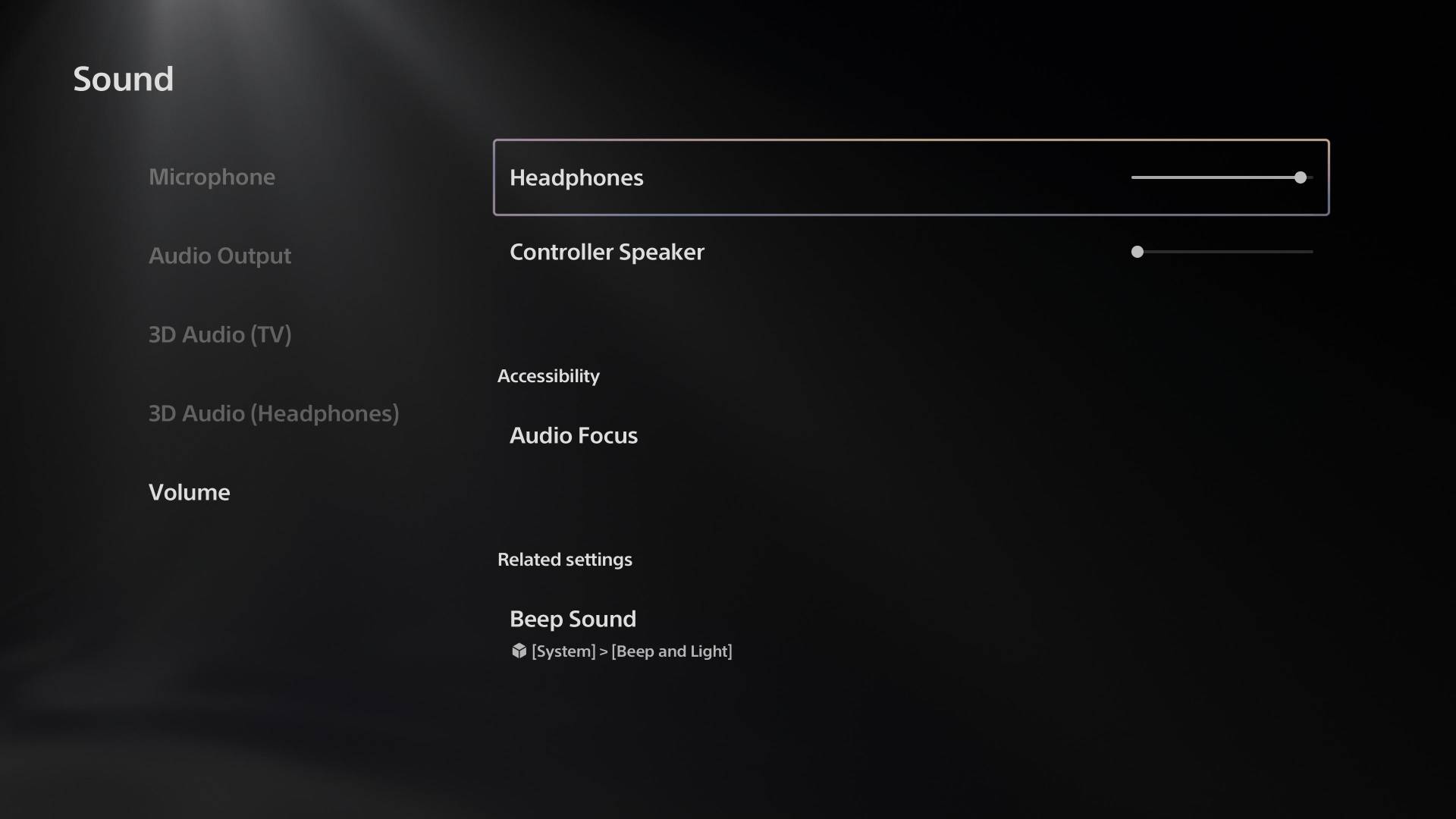
bt-w6 ps5 settings screen

Does the Creative BT-W6 Change PS5 Audio?

The audio when using the Creative BT-W6 on a PS5 is clearer and has lower latency to it. This means that when the sound or music is playing, you hear it sooner. Rather than there being a big delay of sorts, the audio is streamlined. So it doesn’t mess with your experience, and you get to hear things as they were meant to be. So if you are connecting a headset to it, you don’t have to worry about any major audio delays anymore. Something that can make a big difference in such games as Call of Duty.

The device is good for players who want to have no wires all over the place. And as someone who uses wired, it can be tricky to deal with. Furthermore, being able to get the best audio experience on this current console generation is important.

TAGGED: Audio Transmitter, BT-W6, How To, PS5 Accessories
Chris Melnyk November 25, 2025
Share this Article
Facebook Twitter Whatsapp Whatsapp Reddit Email Copy Link Print
Previous Article PS5 consoles How to Optimise PS5 Performance for Competitive Play
Next Article How to Connect a PS4PS5 to Hotel WiFi How to Connect a PS4/PS5 to Hotel WiFi

Recent Posts

  • Valorant Matches: Why the Real Battle Isn’t Aim, Agents, or Utility — It’s Information Warfare
    December 8, 2025
  • The Fortnite Hatsune Miku Zero Hour Rumors
    December 3, 2025
  • schedule 1 steam pictureIs Schedule 1 on PS5?
    November 26, 2025
  • Astro Bot DualSenseHow Long Does a PS5 Controller Take to Charge?
    November 26, 2025
  • How to Connect a PS4PS5 to Hotel WiFiHow to Connect a PS4/PS5 to Hotel WiFi
    November 26, 2025
  • BT-W6 feature with a ps5How Do I Install the Creative BT-W6 on PS5?
    November 25, 2025
  • PS5 consolesHow to Optimise PS5 Performance for Competitive Play
    November 23, 2025
  • Sabo in One PIece OdysseyTop 10 Best Anime-Style Games on PS5
    October 27, 2025

You Might Also Like

Astro Bot DualSense
AccessoriesHow To Guides

How Long Does a PS5 Controller Take to Charge?

3 Min Read
How to Connect a PS4PS5 to Hotel WiFi
ConsoleHow To Guides

How to Connect a PS4/PS5 to Hotel WiFi

2 Min Read
PS5 consoles
ConsoleEditorials

How to Optimise PS5 Performance for Competitive Play

7 Min Read
Sony logo
ConsoleEditorialsFeatured

What is Cloud Gaming on PS5?

3 Min Read
Follow US

© 2013 - 2024 PS5Home.com. All Rights Reserved.

Our Friends: iNet Ventures / PS4 Home / Gamerbolt.com

  • Home
  • Contact and Advertising

Removed from reading list

Undo
Welcome Back!

Sign in to your account

Lost your password?
