

By using this site, you agree to the Privacy Policy and Terms of Use.
Accept
PS5 Home - The Home of PS5PS5 Home - The Home of PS5
  • Editorials
    EditorialsShow More
    Diamond Casino GTA
    Casino and Poker Video Games Worth Playing on PS5
    7 Min Read
    Forza Horizon 6 key art
    PS5 Games to Play While Waiting for Forza Horizon 6
    5 Min Read
    Sports Betting and Console Gaming: How Two Digital Worlds Are Converging for Modern Fans
    6 Min Read
    Dinosaur from The Lost Wild
    The Lost Wild Looks Like the Dino Crisis Sequel We’ll Likely Never Get
    6 Min Read
    A character from Concord with a downward-facing red arrow in the background
    PlayStation’s Declining First-Party Game Sales Shows that Its Live Service Gamble Hasn’t Paid Off
    7 Min Read
  • Games
    GamesShow More
    sand: raiders of sophie ps5 feature
    Is SAND: Raiders of Sophie Coming to PS5?
    4 Min Read
    Diamond Casino GTA
    Casino and Poker Video Games Worth Playing on PS5
    7 Min Read
    Forza Horizon 6 key art
    PS5 Games to Play While Waiting for Forza Horizon 6
    5 Min Read
    halo campaign evolved trophy list feature
    Halo: Campaign Evolved Trophy List
    7 Min Read
    PS App
    The Future of Mobile Gaming and Its Growing Influence
    3 Min Read
  • News
    NewsShow More
    sand: raiders of sophie ps5 feature
    Is SAND: Raiders of Sophie Coming to PS5?
    4 Min Read
    MSI 2026 Betting Picture Before the Field Locks
    6 Min Read
    Spring Split Upsets Completely Shuffle Regional Seedings Ahead Of Daejeon LAN Matches
    9 Min Read
    The logo for the Tearaway.me website
    Tearaway’s Companion Website is Being Shut Down
    4 Min Read
    call of duty ps4 feature with soldiers
    New Call of Duty is Absent from PS4
    3 Min Read
  • Guides
    GuidesShow More
    halo campaign evolved trophy list feature
    Halo: Campaign Evolved Trophy List
    7 Min Read
    PS App
    The Future of Mobile Gaming and Its Growing Influence
    3 Min Read
    PlayStation logo with button symbols on a blue background
    Why Digital Communities Have Become Essential for Gamers 
    3 Min Read
    PS App
    The Impact of Cloud Gaming on Modern Entertainment 
    4 Min Read
    PlayStation Plus Essential logo
    How Subscription Services Are Reshaping the Gaming Industry 
    4 Min Read
  • Console
    ConsoleShow More
    PlayStation Plus logo with a red arrow pointing upwards
    The Latest PS Plus Price Increase is Bad Optics for the PlayStation Brand
    7 Min Read
    Mobile vs PS5
    Can Mobile Gaming Really Compete with PlayStation When It Comes to Traditional Experiences?
    6 Min Read
    Arc Survival Ascended gameplay
    Best Arc: Survival Ascended Mods on PS5
    4 Min Read
    Beyond the Dashboard: Mastering the PS5’s Hidden Web Browser
    5 Min Read
    How to Fix “Restricted From Communication Features” Error on PS5
    3 Min Read
  • Accessories
    AccessoriesShow More
    Top 5 PS5 Games With Amazing DualSense Support
    Top 5 PS5 Games With Amazing DualSense Support
    6 Min Read
    Arc Raiders Steam screenshot
    How to Fix Arc Raiders Mic Not Working on PS5
    3 Min Read
    PS5
    The Best TVs For Your PS5
    6 Min Read
    Astro Bot DualSense
    Best Third-Party PS5 Controllers
    3 Min Read
    how to recalibrate ps5 controller
    How to Recalibrate a PS5 Controller
    2 Min Read
Reading: How to Connect & Use a PS5 Controller on PC
Share
Sign In
Aa
PS5 Home - The Home of PS5PS5 Home - The Home of PS5
Aa
  • Editorials
  • Games
  • News
  • Guides
  • Console
  • Accessories
  • Editorials
  • Games
  • News
  • Guides
  • Console
  • Accessories
Have an existing account? Sign In
Follow US
PS5 Home - The Home of PS5 > Accessories > How to Connect & Use a PS5 Controller on PC
AccessoriesFeaturedGuides

How to Connect & Use a PS5 Controller on PC

Nikola Pajtic
Last updated: 2024/08/13 at 5:44 PM
Nikola Pajtic Published August 13, 2024
Share
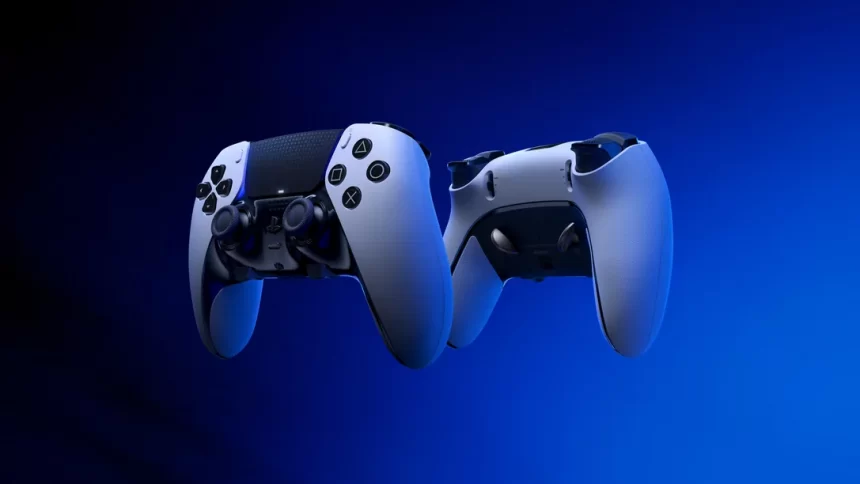
Dualsense Edge
SHARE
Contents
How to Connect Your PS5 Controller to PCHow to Use Your PS5 Controller on PC

When released, the Sony DualSense controller was regarded as a tech marvel, thanks to its ergonomic design and innovative features that came with it. The haptic feedback, adaptive triggers, bluetooth, and much more only improved the gaming experience for gamers worldwide who got their hands on the next-gen PS5.

While primarily designed for the PS5, it is also a great option for PC gamers who want a controller that is out of the ordinary. Fortunately, connecting and using a PS5 controller on your PC is pretty straightforward and we will guide you through the process.

How to Connect Your PS5 Controller to PC

ps5 to pc wireless

There are a few ways to connect your PS5 controller to a PC. However, before you start, there are a few things you will need, including:

  • Data-Ready USB-C Cable: The DualSense controller doesn’t come with a USB-C cable if purchased as a standalone item, so you’ll need one that supports data transfer (not just power). You can use a USB-C to USB-A cable for traditional rectangular ports or a USB-C to USB-C cable if your PC has a USB-C port.
  • Bluetooth Adapter for PC: If your PC doesn’t have built-in Bluetooth, you’ll need a Bluetooth adapter. These are available in various forms, including USB adapters or PCIe cards for internal installation.

How to Pair the PS5 Controller with USB

Now that you have a data cable, all you need to do is plug it into an available USB port on your PC. Then, connect the second part of the cable to the USB-C port on your PS5 controller. PC will recognize the DualSense controller as a gamepad and thanks to Windows built-in compatibility you will be ready to play games that support the PS5 controller on PC.

See also:  How and Why to Factory Reset Your PS5

How to Connect the PS5 Controller to PC via Bluetooth

The first way is an easier one, but if you don’t like cables, then connection over bluetooth is a way for you. To establish this connection demands a bit more effort than previous and because of that, here is a simple step-by-step guide on how to connect the PS5 controller to a PC via bluetooth:

  1. Access your PC’s Bluetooth settings by pressing the Windows key, typing “Bluetooth,” and selecting Bluetooth & other devices.
  2. Click Add Bluetooth or other devices.
  3. Select Bluetooth in the pop-up window.
  4. On your DualSense controller (ensure it’s powered off), press and hold the PS Button and Create button simultaneously until the light bar under the touchpad starts blinking.
  5. On your PC, select your DualSense controller from the list of available Bluetooth devices.

Once paired, your DualSense controller will function wirelessly with your PC.

How to Use Your PS5 Controller on PC

PS5 controller Pc steam

Now that you have managed to connect the PS5 controller to the PC, it is time to start using it. However, it is not all that simple. Since most games require Steam or another client your controller needs to connect with Steam.

  • Open Steam and go to Settings > Controller.
  • Ensure PlayStation Configuration Support is enabled.
  • Customize button layouts, sensitivity, and other settings as desired.

Many games on Steam will automatically recognize the DualSense and provide optimal controls.

While Steam offers the most seamless experience, you can still use your DualSense with non-Steam games.

  • DS4Windows: This third-party application emulates the DualSense as an Xbox controller, allowing compatibility with a wider range of games. Download and install DS4Windows from the official GitHub repository.
  • DirectInput: Some games support DirectInput, which is the standard input method for Windows controllers. However, compatibility might be limited.
See also:  How to Fix PS5 DNS Error
TAGGED: ps5, sony
Nikola Pajtic August 13, 2024
Share this Article
Facebook Twitter Whatsapp Whatsapp Reddit Email Copy Link Print
Previous Article Guitar Hero 3 cover art with PlayStation logo Is Guitar Hero Coming to PS5?
Next Article Sony Pulse Explore The Best Earbuds to Use with Your PS5

Recent Posts

  • sand: raiders of sophie ps5 featureIs SAND: Raiders of Sophie Coming to PS5?
    June 24, 2026
  • Diamond Casino GTACasino and Poker Video Games Worth Playing on PS5
    June 23, 2026
  • Forza Horizon 6 key artPS5 Games to Play While Waiting for Forza Horizon 6
    June 21, 2026
  • halo campaign evolved trophy list featureHalo: Campaign Evolved Trophy List
    June 17, 2026
  • PS AppThe Future of Mobile Gaming and Its Growing Influence
    June 15, 2026
  • PlayStation logo with button symbols on a blue backgroundWhy Digital Communities Have Become Essential for Gamers 
    June 15, 2026
  • PS AppThe Impact of Cloud Gaming on Modern Entertainment 
    June 15, 2026
  • PlayStation Plus Essential logoHow Subscription Services Are Reshaping the Gaming Industry 
    June 15, 2026

You Might Also Like

sand: raiders of sophie ps5 feature
FeaturedGamesNews

Is SAND: Raiders of Sophie Coming to PS5?

4 Min Read
halo campaign evolved trophy list feature
FeaturedGamesGuides

Halo: Campaign Evolved Trophy List

7 Min Read
PS App
GamesGuides

The Future of Mobile Gaming and Its Growing Influence

3 Min Read
PlayStation logo with button symbols on a blue background
GamesGuides

Why Digital Communities Have Become Essential for Gamers 

3 Min Read
Follow US

© 2013 - 2026 PS5Home.com. All Rights Reserved.

Operated by Power Up Gaming Ltd (Company No. 17094696).

Our Friends: iNet Ventures / PS4 Home / Gamerbolt.com

  • Home
  • Contact and Advertising

Removed from reading list

Undo
Welcome Back!

Sign in to your account

Lost your password?
