

By using this site, you agree to the Privacy Policy and Terms of Use.
Accept
PS5 Home - The Home of PS5PS5 Home - The Home of PS5
  • Editorials
    EditorialsShow More
    DualSense Nova Pink
    How PlayStation Gamers Are Building Real Money Gaming Skills Through Console Play
    7 Min Read
    Evaluating User Experience Beyond Games: What Platform Reviews Can Learn From Gaming Culture
    5 Min Read
    Valorant console art
    How Are Valorant’s PC and PS5 Versions Different?
    4 Min Read
    Top 5 PS5 Games With Amazing DualSense Support
    Top 5 PS5 Games With Amazing DualSense Support
    6 Min Read
    PlayStation Store
    Digital Beats Disc: Why Irish PS5 Gamers are Spending Less on the Same Games in Spring 2026
    5 Min Read
  • Games
    GamesShow More
    DualSense Nova Pink
    How PlayStation Gamers Are Building Real Money Gaming Skills Through Console Play
    7 Min Read
    Evaluating User Experience Beyond Games: What Platform Reviews Can Learn From Gaming Culture
    5 Min Read
    About to fight the Bloodedge Demon in Nioh 3
    How to Find Bloodedge Demon in Nioh 3
    4 Min Read
    PlayStation Store
    Digital Beats Disc: Why Irish PS5 Gamers are Spending Less on the Same Games in Spring 2026
    5 Min Read
    Top 5 PS5 Games With a Female Protagonist, Ranked
    Top 5 PS5 Games With a Female Protagonist, Ranked
    5 Min Read
  • News
    NewsShow More
    far cry 3 remastered feature with vaas
    Far Cry 3 Remastered Among Three Games Getting 60 FPS on PS5
    3 Min Read
    PS Plus extra and premium august 2024 promo image
    PlayStation Plus August 2024 Free Games Revealed
    10 Min Read
    Guitar Hero 3 cover art with PlayStation logo
    Is Guitar Hero Coming to PS5?
    3 Min Read
    Palworld monster with giant gun
    Will Palworld Come to PS5?
    3 Min Read
    Is Starfield on PS5?
    2 Min Read
  • How To Guides
    How To GuidesShow More
    Beyond the Dashboard: Mastering the PS5’s Hidden Web Browser
    5 Min Read
    About to fight the Bloodedge Demon in Nioh 3
    How to Find Bloodedge Demon in Nioh 3
    4 Min Read
    Ghost of Yotei
    Ghost of Yotei: How to Craft Weapons
    6 Min Read
    FFXIV Gil
    How Smart Players Build and Protect Wealth in FFXIV
    15 Min Read
    A tree enemy in Crimson Desert
    Best Crimson Desert Settings for the PS5
    3 Min Read
  • Console
    ConsoleShow More
    Beyond the Dashboard: Mastering the PS5’s Hidden Web Browser
    5 Min Read
    How to Fix “Restricted From Communication Features” Error on PS5
    3 Min Read
    How the PS5 Is Accelerating the Move to All-Digital Gaming
    10 Min Read
    How to Tell if My PS5 is Region Locked
    How to Tell if My PS5 is Region Locked
    2 Min Read
    Online Privacy Concerns Grow Among Console Gamers
    5 Min Read
  • Accessories
    AccessoriesShow More
    Top 5 PS5 Games With Amazing DualSense Support
    Top 5 PS5 Games With Amazing DualSense Support
    6 Min Read
    Arc Raiders Steam screenshot
    How to Fix Arc Raiders Mic Not Working on PS5
    3 Min Read
    PS5
    The Best TVs For Your PS5
    6 Min Read
    Astro Bot DualSense
    Best Third-Party PS5 Controllers
    3 Min Read
    how to recalibrate ps5 controller
    How to Recalibrate a PS5 Controller
    2 Min Read
Reading: How to Check the PS5 Controller Battery % on PC
Share
Sign In
Aa
PS5 Home - The Home of PS5PS5 Home - The Home of PS5
Aa
  • Editorials
  • Games
  • News
  • How To Guides
  • Console
  • Accessories
  • Editorials
  • Games
  • News
  • How To Guides
  • Console
  • Accessories
Have an existing account? Sign In
Follow US
PS5 Home - The Home of PS5 > Accessories > How to Check the PS5 Controller Battery % on PC
AccessoriesHow To Guides

How to Check the PS5 Controller Battery % on PC

Hannan Mundia
Last updated: 2025/12/18 at 9:47 PM
Hannan Mundia Published December 18, 2025
Share
SHARE

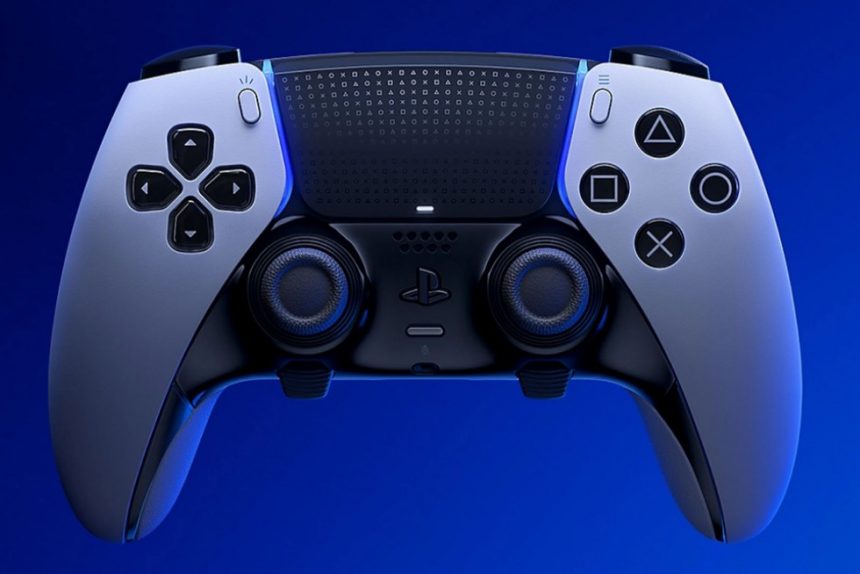
It’s a well-known fact that players can use their PS5’s controller on multiple devices. These devices include Steam Decks and even PCs, despite the difference in platforms. These controllers work just like any other controllers do, but some of their drawbacks are clear.

In particular, because the controllers are being used on a device they weren’t made for, it can get tough to use their functions properly. For example, checking the PS5 DualSense’s battery on a PS5 is extremely straightforward, but doing the same thing when using the controller on a PC isn’t nearly as easy.

How Do You Check the Charge on Your PS5 Controller On PC?

The PlayStation Accessories application

The most reliable way to check the charging on your PS5 controller while you’re using it with a PC is through the official PlayStation Accessories application. To start, simply download and install the app. Then, connect your DualSense controller either via cable or Bluetooth and launch the app. Your controller’s current charge will then show on the main screen.

While Steam states that it showcases the charging of all sorts of Bluetooth devices, it can be slightly unreliable when it comes to using it for a PlayStation 5 controller. Because of this, players have stated that they haven’t been able to check their PS5 controller battery when using it on PC through Steam.

Those who don’t mind installing third-party applications may also like DS4Windows, which is the most reliable utility for everything related to using controllers on PC. All you have to do is download the app and link your PS5 controller. You’ll then be able to see your controller and its battery percentage, which is something that not even the official PlayStation Accessories app does. To take things a step further, DS4Windows also lets players customize other features of their PS5 controller, including the LED light and more.

See also:  How to Fix PS5 HDMI Handshake Issues
TAGGED: Dualsense, ps5
Hannan Mundia December 18, 2025
Share this Article
Facebook Twitter Whatsapp Whatsapp Reddit Email Copy Link Print
Posted by Hannan Mundia
Follow:
I'm Hannan Mundia, an avid gamer and seasoned journalist who loves talking and writing about video games. From RPGs to platformers, I love immersing myself in all sorts of games to imagine myself in new and wonderous worlds.
Previous Article dev error 0xd8e46539 black ops 6 feature How to Fix Dev Error 0xd8e46539 in Black Ops 6 on PS5
Next Article Vbucks PS5 Gift Card How to Redeem Fortnite Gift Cards on PS5

Recent Posts

  • Beyond the Dashboard: Mastering the PS5’s Hidden Web Browser
    April 20, 2026
  • DualSense Nova PinkHow PlayStation Gamers Are Building Real Money Gaming Skills Through Console Play
    April 17, 2026
  • Evaluating User Experience Beyond Games: What Platform Reviews Can Learn From Gaming Culture
    April 15, 2026
  • Valorant console artHow Are Valorant’s PC and PS5 Versions Different?
    April 14, 2026
  • Top 5 PS5 Games With Amazing DualSense SupportTop 5 PS5 Games With Amazing DualSense Support
    April 14, 2026
  • About to fight the Bloodedge Demon in Nioh 3How to Find Bloodedge Demon in Nioh 3
    April 13, 2026
  • PlayStation StoreDigital Beats Disc: Why Irish PS5 Gamers are Spending Less on the Same Games in Spring 2026
    April 9, 2026
  • Top 5 PS5 Games With a Female Protagonist, RankedTop 5 PS5 Games With a Female Protagonist, Ranked
    April 8, 2026

You Might Also Like

ConsoleHow To Guides

Beyond the Dashboard: Mastering the PS5’s Hidden Web Browser

5 Min Read
Top 5 PS5 Games With Amazing DualSense Support
AccessoriesEditorials

Top 5 PS5 Games With Amazing DualSense Support

6 Min Read
About to fight the Bloodedge Demon in Nioh 3
Editor's picksGamesHow To Guides

How to Find Bloodedge Demon in Nioh 3

4 Min Read
Ghost of Yotei
FeaturedGamesHow To Guides

Ghost of Yotei: How to Craft Weapons

6 Min Read
Follow US

© 2013 - 2026 PS5Home.com. All Rights Reserved.

Our Friends: iNet Ventures / PS4 Home / Gamerbolt.com

  • Home
  • Contact and Advertising

Removed from reading list

Undo
Welcome Back!

Sign in to your account

Lost your password?
