


By using this site, you agree to the Privacy Policy and Terms of Use.
Accept
PS5 Home - The Home of PS5PS5 Home - The Home of PS5
  • Editorials
    EditorialsShow More
    The Fortnite Hatsune Miku Zero Hour Rumors
    6 Min Read
    schedule 1 steam picture
    Is Schedule 1 on PS5?
    2 Min Read
    PS5 consoles
    How to Optimise PS5 Performance for Competitive Play
    7 Min Read
    Sabo in One PIece Odyssey
    Top 10 Best Anime-Style Games on PS5
    10 Min Read
    Sony logo
    What is Cloud Gaming on PS5?
    3 Min Read
  • Games
    GamesShow More
    The Fortnite Hatsune Miku Zero Hour Rumors
    6 Min Read
    schedule 1 steam picture
    Is Schedule 1 on PS5?
    2 Min Read
    Sabo in One PIece Odyssey
    Top 10 Best Anime-Style Games on PS5
    10 Min Read
    Exclusive PlayStation 5 Games Worth Trying
    12 Min Read
    Nier Automata screenshot
    Top 10 Games with the Best Soundtracks on PS5
    10 Min Read
  • News
    NewsShow More
    PS Plus extra and premium august 2024 promo image
    PlayStation Plus August 2024 Free Games Revealed
    10 Min Read
    Guitar Hero 3 cover art with PlayStation logo
    Is Guitar Hero Coming to PS5?
    3 Min Read
    Palworld monster with giant gun
    Will Palworld Come to PS5?
    3 Min Read
    Is Starfield on PS5?
    2 Min Read
    PS6 Release Date – News, Price, Release Date, Specs, and Rumours
    9 Min Read
  • How To Guides
    How To GuidesShow More
    Astro Bot DualSense
    How Long Does a PS5 Controller Take to Charge?
    3 Min Read
    How to Connect a PS4PS5 to Hotel WiFi
    How to Connect a PS4/PS5 to Hotel WiFi
    2 Min Read
    BT-W6 feature with a ps5
    How Do I Install the Creative BT-W6 on PS5?
    4 Min Read
    Upload PS5 Media to Mobile
    How to Upload PS5 Media to Your Mobile
    2 Min Read
    How to Use Spotify on PS5
    How to Use Spotify on PS5
    2 Min Read
  • Console
    ConsoleShow More
    How to Connect a PS4PS5 to Hotel WiFi
    How to Connect a PS4/PS5 to Hotel WiFi
    2 Min Read
    BT-W6 feature with a ps5
    How Do I Install the Creative BT-W6 on PS5?
    4 Min Read
    PS5 consoles
    How to Optimise PS5 Performance for Competitive Play
    7 Min Read
    Sony logo
    What is Cloud Gaming on PS5?
    3 Min Read
    Upload PS5 Media to Mobile
    How to Upload PS5 Media to Your Mobile
    2 Min Read
  • Accessories
    AccessoriesShow More
    Astro Bot DualSense
    How Long Does a PS5 Controller Take to Charge?
    3 Min Read
    BT-W6 feature with a ps5
    How Do I Install the Creative BT-W6 on PS5?
    4 Min Read
    How to Fix Mic Echo on the PS5
    How to Fix Mic Echo on the PS5
    3 Min Read
    How to Update a PS5 Controller
    How to Update a PS5 Controller
    2 Min Read
    How to Connect PS5 Controller to iPad
    How to Connect PS5 Controller to iPad
    2 Min Read
Reading: Where To Find PS5 Serial And Model Numbers
Share
Sign In
Aa
PS5 Home - The Home of PS5PS5 Home - The Home of PS5
Aa
  • Editorials
  • Games
  • News
  • How To Guides
  • Console
  • Accessories
  • Editorials
  • Games
  • News
  • How To Guides
  • Console
  • Accessories
Have an existing account? Sign In
Follow US
PS5 Home - The Home of PS5 > Console > Where To Find PS5 Serial And Model Numbers
ConsoleHow To Guides

Where To Find PS5 Serial And Model Numbers

PS5 Home
Last updated: 2024/11/12 at 11:53 PM
PS5 Home Published October 12, 2022
Share
SHARE
Contents
Where to find PS5 serial numberWhere to find PS5 model numberWhat should I do if my PS5 doesn’t have a serial number?What should I do if my PS5 doesn’t have a model number?What could Sony need this information for?

Sometimes, you might need to find some critical information about your PS5, but you might not be entirely sure where you can locate it. This information includes your PS5 serial number, which Sony might ask for during troubleshooting, or your PS5 model number, which, again, could come in handy if someone is trying to diagnose a problem you’re experiencing.

Finding the PS5’s serial number and model number is a lot easier than you might think it is, but it can’t be done through software. Instead, you’re going to have to physically examine your console to locate this information. Once you have it, make sure you write it down! Here’s where to find PS5 serial numbers and PS5 model numbers so that you’re armed with that info when Sony asks for it (or, indeed, a third-party repair service does).

Where to find PS5 serial number

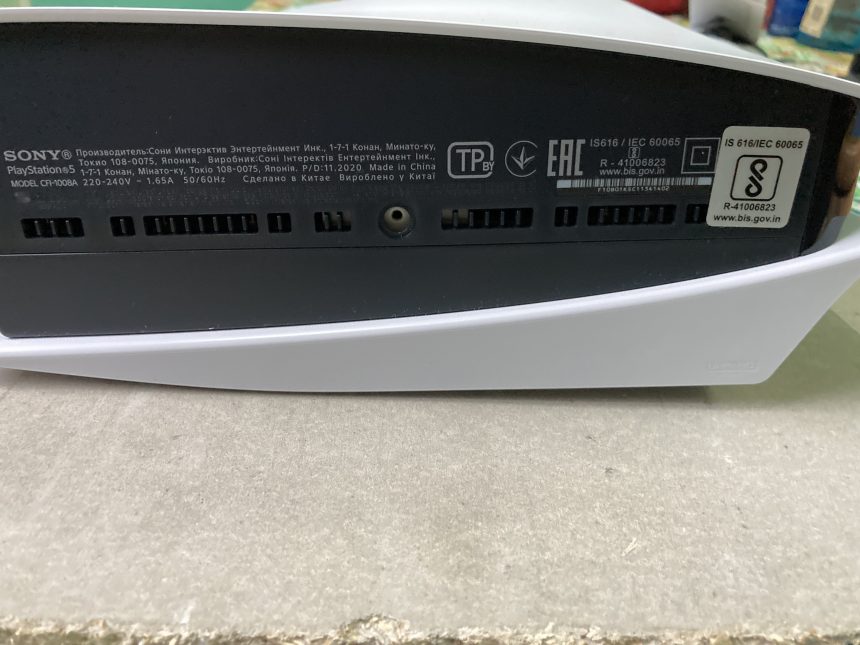
Your PS5 serial number can be located on the bottom of the unit itself. When we say the “bottom”, we’re referring to the console being positioned vertically; if your console is horizontal, then you can find the serial number on the left-hand side of the machine. 

  • Remove the PS5’s stand. If you’ve got your PS5 standing vertically, then you’re going to need to take off the stand if you want to find the serial number. Don’t worry – you can always re-attach it afterwards.
  • Check the part that looks like a barcode. You should see a small symbol that looks a little like a barcode once you’ve removed the PS5’s stand. This is the console’s serial number. It should consist of 17 characters.
  • Write down the serial number. Make sure that you take note of what your PS5’s serial number is, because the last thing you want to do is forget and have to repeat this cumbersome (although not particularly difficult) process all over again.
See also:  Why You Can't Play PS5 Games From an External Hard Drive Directly

Where to find PS5 model number

Unlike your PS5 serial number, you can actually find your PS5 model number in two different places. If you don’t want to take off your PS5’s stand and you’d rather leave the console where it is, you might be in luck (although, again, you will have to remove the stand if you want to find the serial number). First, here’s how to find it if you’re looking on the console itself.

  • Remove the stand. If you do want to find your PS5 model number on the machine itself, then you’re going to have to remove the stand, so make sure you do that. Use caution, as you don’t want to damage the console (which is difficult to do when removing the stand, but it is possible).
  • Check for the model number. You should see the model number near to the serial number. The PS5 model number should consist of eight characters, and the format should be as follows: the letters CFI, then a four-digit number starting with 100, and finally either an A or a B.
  • Note down the model number. Again, do be sure not to forget your PS5 model number. Write it down as soon as you know what it is. Don’t forget it! You don’t want to have to repeat this.

If you don’t want to go through this, then you can actually find the PS5 model number on the box in which your console came. Search the box to see if you can find a number that’s formatted in the same way we just outlined above: CFI100(x)A or CFI100(x)B. One of these two combinations of characters should be somewhere on your PS5 or on the box in which it came.

See also:  How to Fix PS5 DNS Error

What should I do if my PS5 doesn’t have a serial number?

Your PS5 not having a serial number is cause for concern. If you don’t see a serial number on the bottom of your PS5, then you should contact the retailer from which you bought the machine, as there may be an issue with it. If the console doesn’t have a serial number, Sony may refuse to repair it. If it’s a functional machine, third-party repair shops may still be willing to work on it, but you may struggle with the official avenue when it comes to repairs.

What should I do if my PS5 doesn’t have a model number?

Again, a PS5 not having a model number is very unusual. All factory-made PS5 consoles have model numbers printed on them, and if your PS5 is legitimate, then that model number should also be present on the box. If you don’t see it, then again, you should raise that concern with your retailer. Every PS5 that you purchase from Sony will definitely have a model number and a serial number present, and if it doesn’t, then that’s absolutely something you need to raise with Sony or with the place where you bought the console.

What could Sony need this information for?

Having your serial number and model number to hand can be useful when, for instance, booking in a repair. Sony may need this information when they’re assigning information to a repair, so if you don’t have a serial number for your console, then getting an official warranty repair or replacement might be hard. Model numbers, meanwhile, are useful when diagnosing issues; some PS5 models may have problems, for example, that another model has rectified or doesn’t suffer. Be sure to have both of these numbers to hand at all times if you’re a proud PS5 owner!

See also:  How To Fix PS5 Lag Issues

PS5 Home October 12, 2022
Share this Article
Facebook Twitter Whatsapp Whatsapp Reddit Email Copy Link Print
Previous Article Best Board Games On The PS5
Next Article How To Find Players You Recently Met On PS5

Recent Posts

  • The Fortnite Hatsune Miku Zero Hour Rumors
    December 3, 2025
  • schedule 1 steam pictureIs Schedule 1 on PS5?
    November 26, 2025
  • Astro Bot DualSenseHow Long Does a PS5 Controller Take to Charge?
    November 26, 2025
  • How to Connect a PS4PS5 to Hotel WiFiHow to Connect a PS4/PS5 to Hotel WiFi
    November 26, 2025
  • BT-W6 feature with a ps5How Do I Install the Creative BT-W6 on PS5?
    November 25, 2025
  • PS5 consolesHow to Optimise PS5 Performance for Competitive Play
    November 23, 2025
  • Sabo in One PIece OdysseyTop 10 Best Anime-Style Games on PS5
    October 27, 2025
  • Sony logoWhat is Cloud Gaming on PS5?
    October 27, 2025

You Might Also Like

Astro Bot DualSense
AccessoriesHow To Guides

How Long Does a PS5 Controller Take to Charge?

3 Min Read
How to Connect a PS4PS5 to Hotel WiFi
ConsoleHow To Guides

How to Connect a PS4/PS5 to Hotel WiFi

2 Min Read
BT-W6 feature with a ps5
AccessoriesConsoleHow To Guides

How Do I Install the Creative BT-W6 on PS5?

4 Min Read
PS5 consoles
ConsoleEditorials

How to Optimise PS5 Performance for Competitive Play

7 Min Read
Follow US

© 2013 - 2024 PS5Home.com. All Rights Reserved.

Our Friends: iNet Ventures / PS4 Home / Gamerbolt.com

  • Home
  • Contact and Advertising

Removed from reading list

Undo
Welcome Back!

Sign in to your account

Lost your password?
